

On this page
- Tools
- 20: pulse, coins, holders, candles, quote, research, picks, narratives, wallets, paper desk
- Transport
- stdio (JSON-RPC 2.0), zero dependencies
- Clients
- Claude Code, Claude Desktop, Cursor, Codex, Gemini CLI, VS Code, Windsurf, Zed
- Access
- Your BLIX account's session
- Writes
- Your paper desk only; no wallet, no signing
- Community
- The BLIX Discord, with your account
Access comes with your account. Sign in to BLIX with Google, open Developers, and your API session and the MCP connector command are shown there, ready to copy. Everything below assumes you are signed in. Questions: the Discord.
Set it up
# 1. download the connector (one file, no dependencies; needs Node 20+)
curl -O https://blixvip.com/_pub/blix-mcp.mjs
# 2. sign in to BLIX, open https://blixvip.com/developers and copy your session
Claude Code
claude mcp add blix -e BLIX_SESSION=<from your Developers page> -- node /path/to/blix-mcp.mjsClaude Desktop, Cursor, Windsurf
{
  "mcpServers": {
    "blix": {
      "command": "node",
      "args": [
        "/path/to/blix-mcp.mjs"
      ],
      "env": {
        "BLIX_SESSION": "<from your Developers page>"
      }
    }
  }
}
Codex
[mcp_servers.blix]
command = "node"
args = ["/path/to/blix-mcp.mjs"]

[mcp_servers.blix.env]
BLIX_SESSION = "<from your Developers page>"
Gemini CLI (~/.gemini/settings.json)
{
  "mcpServers": {
    "blix": {
      "command": "node",
      "args": [
        "/path/to/blix-mcp.mjs"
      ],
      "env": {
        "BLIX_SESSION": "<from your Developers page>"
      },
      "timeout": 15000
    }
  }
}
VS Code (.vscode/mcp.json)
{
  "servers": {
    "blix": {
      "type": "stdio",
      "command": "node",
      "args": [
        "/path/to/blix-mcp.mjs"
      ],
      "env": {
        "BLIX_SESSION": "<from your Developers page>"
      }
    }
  }
}
Things to ask about pump.fun
- "What launched on pump.fun in the last five minutes with more than 30 traders and no bundles?"
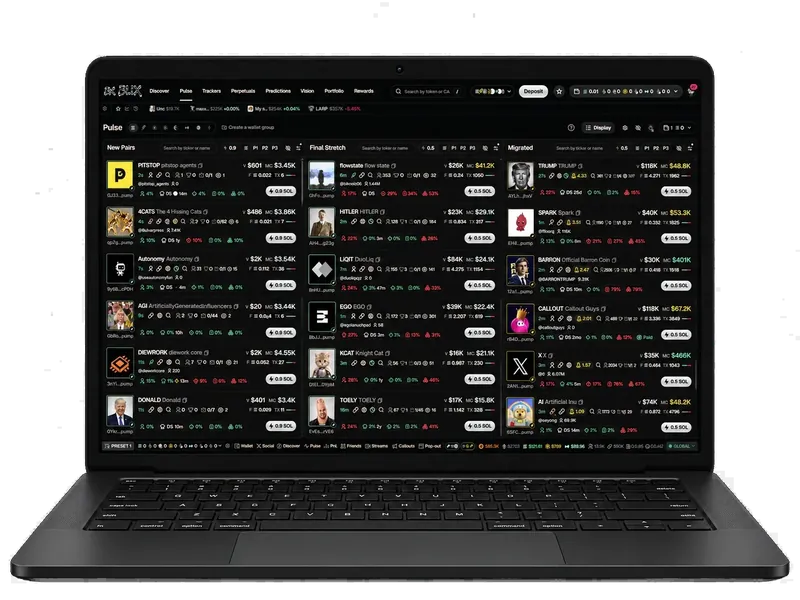
- "Which coins are in the final stretch right now? Rank them by holders and show the dev's share."
- "Is the dev of <mint> still holding? List the top ten holders and tag snipers and bundles."
- "Quote a 0.5 SOL buy of <mint> and tell me the price impact."
- "Paper-buy 0.25 SOL of the strongest final-stretch coin with a 2x take profit and a 40% stop."
- "What narratives are running on pump.fun today, and which coin leads each?"
The pump.fun tools
| Tool | What it returns |
|---|---|
blix_pulse | New launches, final stretch, migrated and running coins with stats and the AI verdict |
blix_coin | Everything on one coin: price history, safety report, holders summary, socials, research, signals |
blix_holders | The live holder ledger with dev, sniper and bundle tags and the top-10 share |
blix_candles | Market-cap candles built from real trades |
blix_quote | A real Jupiter quote: amount out, price impact, route. Nothing is traded |
blix_research | The AI reads on a coin: grade, thesis, plan, sources |
blix_narratives | Themes with heat, launch share, lift, emerging words and lead coins |
blix_paper_buy · blix_paper_sell | Your paper desk, filled at real quotes. Paper money only |
ChatGPT and remote clients
ChatGPT's web app only connects to remote (HTTPS) MCP servers, so it cannot start a local stdio connector. Use OpenAI's Codex CLI, which can, or put the connector behind a stdio-to-HTTP bridge on a machine you control. How to use MCP for crypto covers the options.
The BLIX community
Every account comes with the BLIX Discord: the people trading on the terminal, the narratives as they form, feature drops before they are announced, and the team answering questions. Join the Discord once you have signed up.
More for developers
BLIX is independent and not affiliated with pump.fun. Facts about pump.fun were checked against public sources on October 10, 2026 and can change.
Frequently asked questions
Is there an official pump.fun MCP server?
pump.fun does not publish one as of October 10, 2026. BLIX's MCP connector is independent; it reads pump.fun from the chain through BLIX's own engine, with your account.
Can the agent buy pump.fun coins through MCP?
No. The only write tools are the paper desk's buy and sell, filled at real Jupiter quotes with paper money. There is no wallet or key in the connector. Real trading is in the terminal, by you.
Does it work with ChatGPT?
Not directly: ChatGPT's connectors must be remote HTTPS servers. Codex CLI works with the local connector as is.
What do I need?
A BLIX account (free), Node 20 or newer, and the one-file connector from your Developers page.
Is it free?
Yes, with your BLIX account. The connector calls no paid service.